
Google Ads Uses Generative AI
Google Ads is taking another step toward fully automated advertising creative with an important update to Performance Max (PMax) video ads. Google is increasingly using AI to transform existing video assets into additional formats, helping advertisers reach more placements without having to manually produce separate versions for every screen orientation.
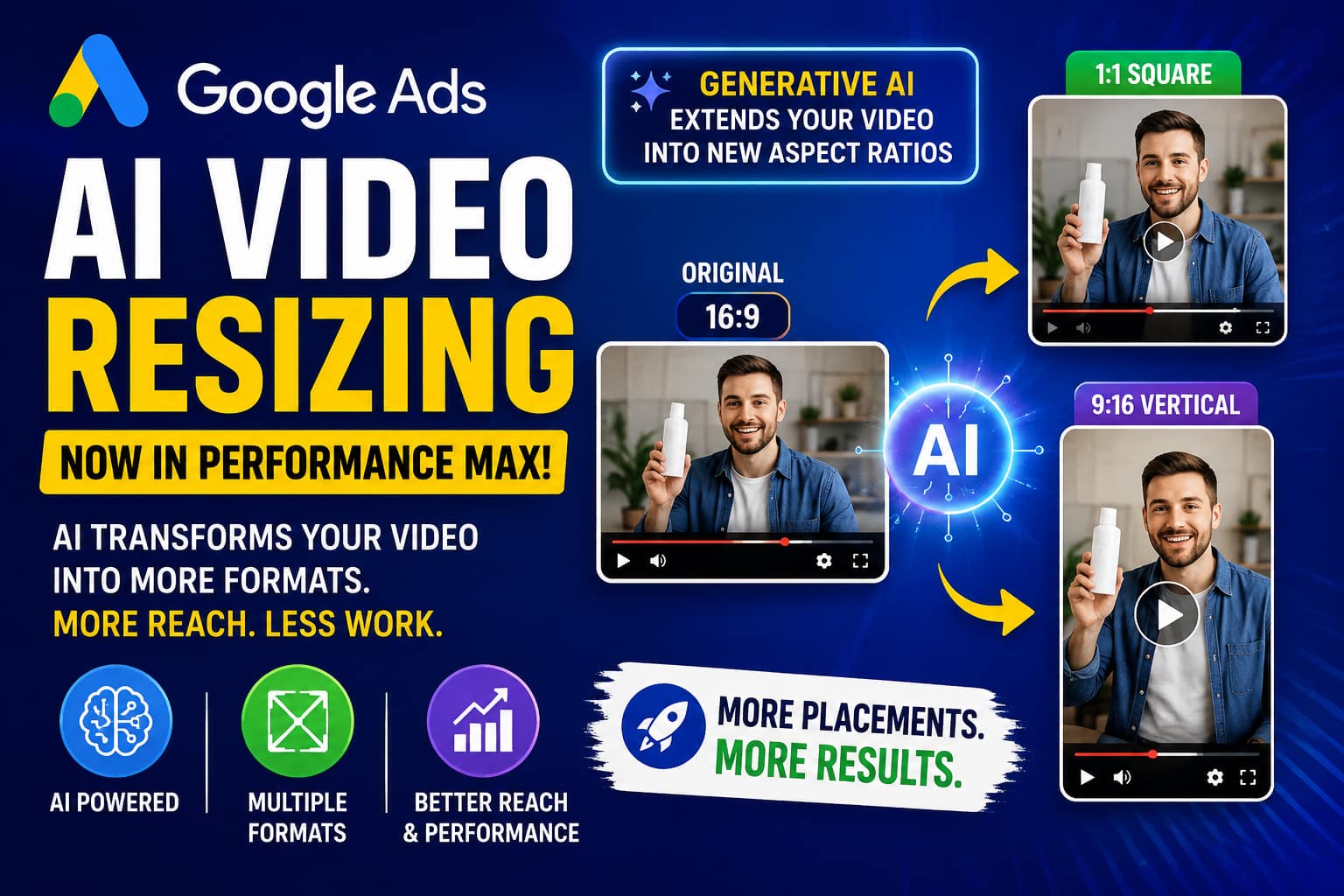
The change is especially relevant for advertisers who create a traditional 16:9 horizontal video but also need square and vertical versions for different YouTube environments. Google says its AI can create additional versions of existing videos, including 1:1 square and 9:16 vertical formats, while generative AI can extend the original video into new aspect ratios.
This development could reduce creative-production work, increase the number of usable video assets in Performance Max campaigns, and make it easier for smaller advertisers to compete in increasingly video-heavy advertising environments.
Google Ads Uses Generative AI
What Is the New Google Ads AI Video Resizing Feature?
Traditionally, advertisers creating a Performance Max campaign had to prepare multiple versions of their video creative.
For example, a marketing team might create:
- 16:9 horizontal video for traditional YouTube placements
- 1:1 square video for certain placements
- 9:16 vertical video for YouTube Shorts
- Shorter versions for different advertising situations
Creating all of these manually can require additional editing, design, approvals, and production time.
Google’s AI-powered video automation changes this workflow. Instead of requiring advertisers to create every version manually, Google can use an existing video and create additional versions automatically.
Google describes Performance Max video automation as a system that can create different versions of existing videos, including different orientations and shorter versions.
The basic workflow
Original video → AI analysis → aspect-ratio transformation → quality review → additional video asset → eligible ad placement
The important development is that generative AI can do more than simply crop a video. Google’s documentation explains that its newer model can intelligently extend the original video into another aspect ratio while preserving the original content.
That distinction matters because a simple crop can remove a product, person, headline, logo, or important visual information.
Why Video Aspect Ratios Matter
Different video environments require different screen shapes.
A horizontal 16:9 video works naturally on traditional widescreen displays, while vertical 9:16 creative is much better suited to full-screen mobile experiences such as YouTube Shorts.
Google currently recommends three important video orientations for Performance Max:
| Orientation | Aspect Ratio | Recommended Resolution | Typical Use |
|---|---|---|---|
| Horizontal | 16:9 | 1920 × 1080 | Widescreen/video placements |
| Square | 1:1 | 1080 × 1080 | Square-compatible placements |
| Vertical | 9:16 | 1080 × 1920 | YouTube Shorts/mobile |
Google recommends including video assets in all three orientations when possible.
The objective is not simply to create more files. It is to give Google’s advertising system more creative options for matching ads with available inventory and viewing environments.
How Google’s Generative AI Resizing Works
The process can be understood in several stages.
1. Advertiser uploads an original video
The advertiser starts with an existing video asset, such as a product advertisement, brand commercial, tutorial, testimonial, or promotional video.
For example:
Original: 16:9 horizontal video
The advertiser does not necessarily need to create separate square and vertical versions manually.
2. Google AI analyzes the video
The system evaluates the video’s visual content and determines how it can be adapted to another orientation.
This is important because resizing video is more complicated than resizing a static image.
The system has to consider:
- People
- Products
- Backgrounds
- Logos
- Text
- Important visual areas
- Composition
- Original message
- Overall visual quality
Google says its video enhancements undergo quality reviews to identify problems such as cropped text, logos, poor focus, loss of the original message, or cut-off legal disclaimers.
3. AI creates additional formats
The system can create alternative versions such as:
16:9 → 1:1
and
16:9 → 9:16
Google’s newer generative approach can extend the original video into a new aspect ratio rather than simply cutting away large parts of the original frame.
4. Google reviews the generated version
Generated versions do not simply appear everywhere automatically.
Google says additional versions are subject to quality review, and enhanced assets are used when they pass the relevant checks and are likely to improve campaign performance.
5. The appropriate version can enter eligible inventory
Once approved, different versions can help the campaign participate in more suitable video environments.
This gives Performance Max more creative flexibility while reducing the amount of manual editing required from advertisers.
Generative AI Resizing vs. Simple Cropping
This is one of the most important parts of the update.
A conventional resizing process might simply take a 16:9 video and crop the sides.
Imagine a horizontal video showing a person standing beside a product.
When the video is converted into 9:16, a simple crop might remove the product or the person’s face.
Generative AI can instead create additional visual space around the original composition, helping the important subject remain visible.
Traditional approach
16:9 video
↓
Crop sides
↓
9:16 video
Potential problem:
- Product may disappear
- Text may be cropped
- Person may be partially removed
- Composition may become unbalanced
AI-assisted approach
16:9 video
↓
Analyze subject and composition
↓
Generate/extend suitable visual space
↓
Adapt composition
↓
9:16 video
The goal is to preserve the original creative message while making the asset usable in another orientation.
Graph 1: Google-Reported Conversion Uplift From Including Video
Google says advertisers with at least one video in their Performance Max campaigns saw an average 12% uplift in conversions compared with campaigns without video. This is a Google-reported average and should not be interpreted as a guaranteed result for every advertiser.

Graph 2: Why Multiple Video Orientations Matter
Google also reports that advertisers who included at least one video in each of the three orientations—horizontal, vertical, and square—delivered 20% more conversions on YouTube compared with using horizontal videos alone. Again, this is a Google-reported benchmark rather than a guaranteed improvement for an individual account.

What This Means for Performance Max Advertisers
The update is more significant than a simple video-editing shortcut.
Performance Max is designed to automate many parts of campaign delivery, including bidding, targeting, asset combinations, and creative optimization. Video automation extends that philosophy into creative production.
Instead of thinking:
“I need to produce three separate videos.”
Advertisers can increasingly think:
“I need to provide strong source creative that Google’s systems can adapt.”
That can change how marketing teams approach creative production.
1. Smaller Businesses Can Reduce Production Costs
Professional video production can become expensive when every campaign requires multiple versions.
A company might previously need:
- Video editor
- Motion designer
- Copywriter
- Creative reviewer
- Multiple exports
- Multiple rounds of approval
AI-assisted resizing can reduce some of that repetitive production work.
This does not mean human creative professionals become unnecessary. Instead, they can spend more time on the original concept, storytelling, branding, product positioning, and testing.
2. Advertisers Can Cover More Video Environments
One of the biggest benefits is creative coverage.
A single horizontal video may not be ideal for every environment.
With AI-generated variants, the advertiser can potentially expand from:
1 source video
to:
Horizontal + square + vertical versions
That creates more opportunities for the campaign to match the format of available inventory.
Google’s current Performance Max guidance specifically encourages advertisers to use diverse video orientations.
3. YouTube Shorts Becomes More Accessible
Vertical video is particularly important for mobile-first viewing.
Google identifies 9:16 vertical video as the format for Shorts-oriented inventory, and its Performance Max documentation explains that horizontal videos may be transformed into square or vertical versions.
For advertisers that traditionally produced only television-style horizontal commercials, this can reduce the barrier to creating Shorts-compatible creative.
4. Creative Testing Can Become Faster
AI-generated variants can also make creative testing more flexible.
For example, an advertiser could begin with one core concept:
“New running shoes for everyday training.”
The original commercial could then be adapted into different formats.
Instead of spending days preparing each technical version, the marketing team can potentially focus more attention on questions such as:
- Which opening scene attracts attention?
- Which product benefit is strongest?
- Which CTA produces more conversions?
- Which audience responds best?
- Does the vertical version perform differently from the horizontal version?
The real strategic advantage is therefore not only saving editing time. It is potentially moving more marketing effort toward creative strategy and performance analysis.
What Advertisers Should Do Differently
Although Google can automatically resize videos, advertisers should not treat AI resizing as a replacement for good creative production.
1. Design the original video for flexibility
If the source video is extremely dependent on a horizontal composition, AI may have a harder job adapting it.
When producing a new video, consider keeping important subjects and text toward the central safe area.
For example:
Better source design
- Product near the center
- Logo visible without depending on extreme edges
- Important text away from borders
- Subject clearly separated from the background
- Simple visual composition
Riskier source design
- Important text at the far edge
- Product partially outside the frame
- Multiple people spread across the entire horizontal canvas
- Tiny captions
- Critical legal information positioned close to the border
A flexible source asset gives AI more room to work.
2. Upload Your Own Video When Possible
Google’s documentation continues to recommend that advertisers upload at least one video themselves, even though Performance Max can generate video automatically from other assets.
This is an important distinction.
AI automation is useful, but the advertiser should still provide strong original creative whenever possible.
Your own video provides:
- Brand control
- Product accuracy
- Planned storytelling
- Deliberate messaging
- Better creative consistency
AI can then help adapt that foundation.
3. Don’t Depend Entirely on Automatic Resizing
Automatic resizing should be viewed as a production assistant—not as a substitute for every purpose-built video.
For major campaigns, consider producing dedicated versions when the message changes significantly by format.
For example:
Horizontal version
Designed for:
YouTube widescreen viewing
Vertical version
Designed for:
Full-screen mobile viewing
Square version
Designed for:
Square-compatible placements
A purpose-built vertical commercial may outperform a resized horizontal commercial because its storytelling was designed around the vertical screen from the beginning.
Recommended Performance Max Video Specifications
Google currently lists three core orientations for Performance Max video assets:
| Video Type | Aspect Ratio | Recommended Resolution |
|---|---|---|
| Horizontal | 16:9 | 1920 × 1080 |
| Square | 1:1 | 1080 × 1080 |
| Vertical | 9:16 | 1080 × 1920 |
Google recommends HD-quality video and says videos should generally be between 10 and 60 seconds for its current best-practice guidance.
Google also recommends having multiple videos across orientations rather than relying on a single creative.
AI Video Resizing Does Not Mean AI Makes Every Video From Scratch
There is an important difference between two Performance Max capabilities.
Video Enhancements
Video enhancements modify existing advertiser-provided video.
They can include:
- Creating different orientations
- Creating shorter versions
- Adding other automated enhancements
Google says video enhancements use AI to create additional versions of existing videos.
Auto-Generated Video Ads
Auto-generated videos are different.
If an eligible Performance Max asset group does not contain an active uploaded video, Google can create videos from other assets such as images and text. For Merchant Center campaigns, product information can also contribute to the generated creative.
This means advertisers should distinguish between:
AI resizing an existing video
and
AI creating a video from other campaign assets.
They solve different creative-production problems.
What Are the Main Benefits?
Faster production
Advertisers can reduce repetitive editing work when multiple aspect ratios are required.
More creative coverage
One source video can potentially produce multiple useful formats.
Better mobile readiness
Vertical versions can help advertisers participate in mobile-first video environments.
More efficient creative workflows
Marketing teams can focus more on concepts and less on repetitive exports.
Potential performance benefits
Google’s own reporting indicates that video and multiple video orientations can be associated with improved conversion outcomes, although actual results vary by account, audience, creative quality, and campaign setup.
What Are the Risks?
AI automation also introduces several considerations.
Cropping and composition problems
Even sophisticated AI may not perfectly understand every brand requirement.
Always review important:
- Logos
- Product details
- Text
- Pricing
- Promotions
- Disclaimers
- Faces
- Calls to action
Google itself describes quality checks for issues such as cropped text, logos, loss of the original message, and cut-off disclaimers.
Brand consistency
A generated extension may not always match a brand’s visual identity as precisely as a professionally produced version.
Product accuracy
Advertisers selling multiple products should pay close attention to asset-group organization and landing-page relevance.
Google notes that automatically generated videos in Merchant Center-based Performance Max campaigns can potentially feature a different product from the one associated with the final landing page if the campaign is not structured carefully.
Less creative control
Automation is valuable, but advertisers give the system some responsibility for how the asset is adapted.
For highly controlled campaigns, purpose-built creative may still be preferable.
A Practical Strategy for Advertisers in 2026
A strong approach is to combine human creativity with AI production automation.(Google Ads Uses Generative AI)
Step 1: Create a high-quality master video
Start with a strong 16:9 video or, ideally, develop the concept with multiple orientations in mind.
Step 2: Keep important elements in safe areas
Avoid putting essential information close to the edges.
Step 3: Upload the original creative
Give Performance Max a high-quality source asset.
Step 4: Allow appropriate video automation
Let Google create additional versions when the feature is appropriate for the campaign.
Step 5: Review generated assets
Check:
- Branding
- Product visibility
- Text
- Voice
- Music
- Legal information
- CTA
- Visual quality
Step 6: Compare performance
Monitor metrics such as:
- Impressions
- Video views
- View rate
- Click-through rate
- Cost per conversion
- Conversion rate
- ROAS
- Asset-level performance
Step 7: Replace weak creative
Don’t assume that every AI-generated version will perform equally well.
Use performance data to identify the strongest creative combinations.
The Bigger Picture: Google Is Turning Ads Into a Creative Automation System
The video-resizing update fits into a much broader direction for Google Ads.
Performance Max already uses AI for campaign optimization, and Google has been adding generative AI capabilities for text, images and video assets.
Google’s current documentation says advertisers can use generative AI to help create assets for Performance Max, including text, images, logos and video.
The evolution can be summarized as:
Manual advertising
↓
Automated bidding
↓
Automated targeting
↓
Automated asset combinations
↓
Generative AI asset creation
↓
Generative AI creative adaptation
↓
AI-driven creative optimization
The video-resizing capability is therefore part of a larger transformation in which advertisers increasingly provide the brand, product information and creative direction, while Google’s systems handle more of the technical production and delivery process.
What This Means for Agencies
Advertising agencies may see a particularly significant impact.
Previously, a client request could involve:
“We need this commercial in three formats.”
That might mean separate editing jobs.
With AI-assisted production, agencies can increasingly move toward:
“We need one strong master concept and a system for generating and testing multiple variations.”
This could reduce low-value production work while increasing demand for higher-value services such as:
- Creative strategy
- Brand positioning
- Storytelling
- Performance analysis
- Conversion optimization
- Creative testing
- Audience research
The role of the creative professional may therefore shift rather than disappear.
What This Means for Small Businesses
Small businesses could benefit substantially because professional video production has historically been a barrier to advertising.
A local business may have:
- Product photographs
- Existing promotional videos
- Website content
- Customer testimonials
- Brand images
Google’s AI-powered tools can increasingly turn those assets into campaign-ready creative variations.
That lowers the technical barrier to participating in video advertising.
However, businesses should still review AI-generated assets carefully before allowing them to represent the brand.
Frequently Asked Questions
Does Google automatically resize Performance Max videos?
Yes. Google says Performance Max can automatically resize video ads into different orientations, including square and vertical formats, to help improve performance and ad strength.
Can Google turn a horizontal video into a vertical video?
Yes. Google says horizontal videos can be adapted into square and vertical formats. Its newer generative AI approach can extend the original video into new aspect ratios while preserving the original content.
What video sizes should advertisers prepare?
The main recommended formats are 16:9 at 1920×1080, 1:1 at 1080×1080, and 9:16 at 1080×1920.
Should advertisers still upload their own videos?
Yes. Google recommends that advertisers upload at least one video themselves, even though its systems can generate videos automatically.
Can advertisers turn off video enhancements?
Google says video enhancements can be turned off in campaign settings under asset optimization and video.
Does AI resizing guarantee better performance?
No. AI resizing is designed to improve creative coverage and campaign performance, but no individual asset or campaign is guaranteed to perform better. Advertisers should monitor actual conversion and revenue data.
Final Takeaway
Google’s use of generative AI to resize Performance Max video ads represents another major step toward automated creative production.
Instead of requiring advertisers to manually produce every aspect ratio, Google can increasingly transform an existing video into formats better suited to different advertising environments.
The most important lesson for advertisers is not to abandon professional creative production. It is to combine strong original creative with intelligent automation.
The winning workflow is likely to be:
Human strategy → high-quality master creative → AI adaptation → quality review → performance testing → continuous optimization
For advertisers, this can mean faster production, broader video coverage, greater access to vertical formats, and more time to focus on the decisions that actually drive business growth.
As Google continues expanding generative AI across Performance Max, video creation is becoming less about manually producing every asset and more about giving AI a strong creative foundation that it can adapt, test and distribute intelligently.
Sources
- Google Ads Help — About video assets for Performance Max campaigns
- Google Ads Help — About video enhancements
- Google Ads Help — About Performance Max video automation
- Google Ads Help — Best practices for video assets in Performance Max campaigns
- Search Engine Land — Google Ads will use generative AI to resize Performance Max video ads