
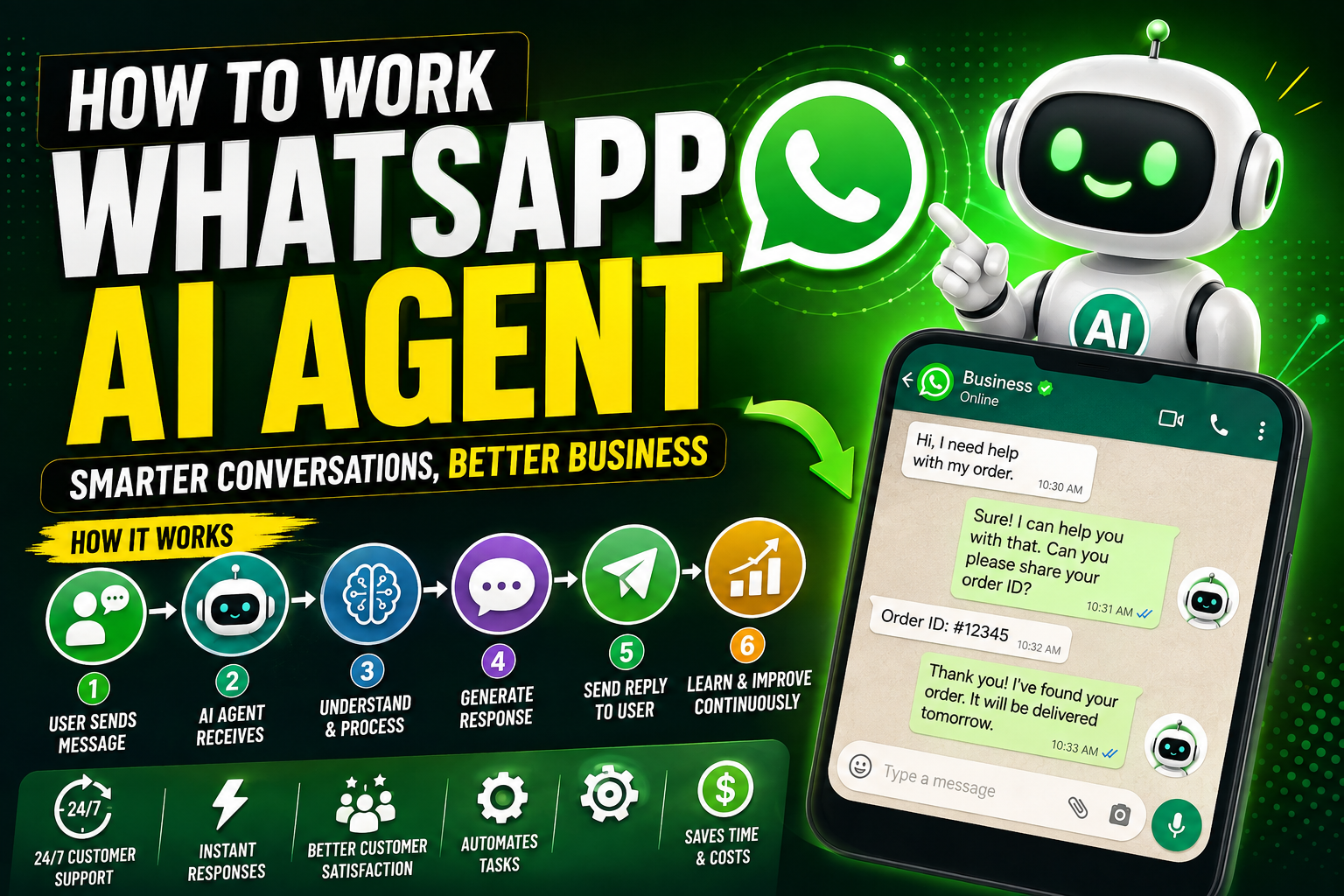
WhatsApp has evolved from a simple messaging application into one of the most important communication channels for businesses. Companies use WhatsApp to answer customer questions, generate leads, provide support, confirm orders, send notifications, and communicate with customers in real time.
The next step in this evolution is the WhatsApp AI Agent.
A WhatsApp AI Agent combines WhatsApp messaging with artificial intelligence, automation, business data, and external tools. Instead of requiring a human employee to respond to every message, an AI agent can understand a customer’s request, decide what needs to happen, retrieve information, perform certain actions, and respond automatically.
For example, a customer could send:
“Where is my order?”
Instead of simply sending a predefined message, an AI agent can identify the customer, check the order system, find the latest shipping status, and reply with the relevant information.
This makes WhatsApp AI agents particularly useful for customer service, e-commerce, sales, appointment scheduling, lead qualification, and business automation.
What Is a WhatsApp AI Agent?
A WhatsApp AI Agent is an automated software system that communicates with users through WhatsApp and uses artificial intelligence to understand and respond to messages.
Unlike a traditional chatbot that mainly follows fixed rules, an AI agent can use language models and connected business systems to handle more complicated conversations.
A typical WhatsApp AI Agent can:
- Read incoming WhatsApp messages
- Understand natural language
- Identify the customer’s intent
- Remember relevant conversation context
- Search a knowledge base
- Retrieve information from databases
- Call external APIs
- Perform business actions
- Generate personalized responses
- Escalate difficult conversations to humans
- Continue conversations automatically
The important difference is that an AI agent is not just a question-and-answer system.
It can potentially understand, reason, retrieve information, use tools, and take action.
How Does a WhatsApp AI Agent Work?
The easiest way to understand the system is to follow a customer’s message from WhatsApp to the AI and back.
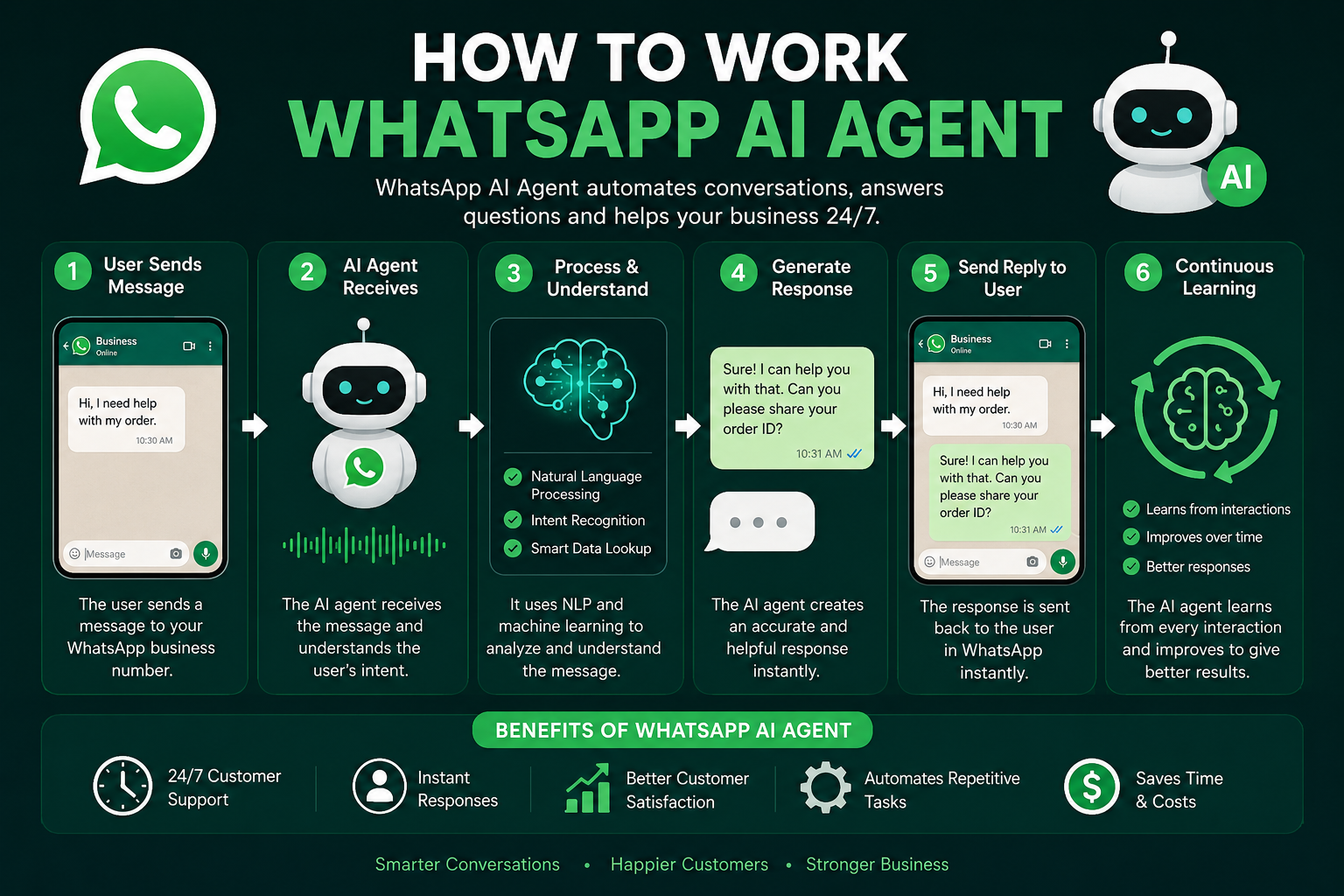
The general process looks like this:
Customer → WhatsApp → Webhook → AI Agent → Business Data/Tools → AI Response → WhatsApp → Customer
Let’s examine each stage.
1. Customer Sends a WhatsApp Message
Everything begins when a customer sends a message.
For example:
“I want to order a blue laptop bag.”
The message enters the business’s WhatsApp communication system.
The WhatsApp platform forwards information about the incoming message to the business’s backend system through an API/webhook architecture.
The backend can then process the message.
2. WhatsApp Sends the Message to Your Backend
The business needs a server or automation platform that can receive incoming WhatsApp events.
The incoming event may contain information such as:
- Customer identifier
- WhatsApp number
- Message text
- Message type
- Timestamp
- Conversation information
- Media information, when applicable
The backend receives the event and determines what should happen next.
A simplified architecture is:
Customer
   ↓
WhatsApp
   ↓
WhatsApp Business API
   ↓
Webhook
   ↓
Your Application
   ↓
AI Agent
The application becomes the bridge between WhatsApp and the AI system.
3. The AI Agent Understands the Message
The next stage is language understanding.
Suppose the customer writes:
“Can I get the black version delivered tomorrow?”
The AI needs to determine several things:
- The customer wants a product.
- The requested color is black.
- The customer is asking about delivery.
- The customer wants delivery tomorrow.
- Additional information may be required.
An AI model processes the message and determines the customer’s intent.
This is commonly called intent detection or intent classification.
4. The AI Agent Uses Conversation Context
A useful AI agent should not treat every message as completely independent.
Consider this conversation:
Customer:
“I want the red shoes.”
AI:
“Sure. What size do you need?”
Customer:
“42.”
The second message contains only “42.”
Without conversation context, the system might not know what “42” refers to.
With conversation memory, the AI understands that the customer is providing the requested shoe size.
Conversation context can include:
- Previous messages
- Customer preferences
- Current order
- التفاعلات السابقة
- Current conversation goal
- Information already collected
This makes conversations feel more natural.
5. The AI Agent Decides Whether It Needs a Tool
This is one of the most important differences between a basic chatbot and an AI agent.
Suppose a customer asks:
“Is order #78452 out for delivery?”
The AI cannot reliably answer this from its language model alone.
It needs current information from the company’s order system.
The AI agent can therefore decide:
I need to query the order database.
The architecture becomes:
Customer Question
       ↓
AI Agent
       ↓
Determine Required Action
       ↓
Order API
       ↓
Retrieve Order Status
       ↓
AI Agent
       ↓
Generate Response
       ↓
WhatsApp
This tool-using capability makes an AI agent much more powerful.
6. Connecting the AI Agent to Business Systems
A WhatsApp AI Agent becomes significantly more useful when connected to external systems.
Depending on the business, it may connect to:
- CRM systems
- E-commerce platforms
- Payment systems
- Inventory databases
- Booking systems
- Customer databases
- Help-desk software
- Shipping APIs
- Calendars
- Internal company APIs
- Knowledge bases
For example, a restaurant AI agent might connect to a reservation system.
A customer could write:
“Do you have a table for four tonight at 8 PM?”
The AI could check the reservation system and return available options.
7. The AI Generates a Response
Once the agent has collected the necessary information, it generates a response.
For example, after checking an order API, the system might discover:
- Order: #78452
- Status: Out for delivery
- Estimated arrival: Today
- Courier: XYZ Delivery
The AI can turn this structured information into a natural response:
“Your order #78452 is currently out for delivery and is expected to arrive today.”
The response can then be sent back through WhatsApp.
8. WhatsApp Delivers the Response
The backend sends the generated response through the appropriate WhatsApp business messaging infrastructure.
The customer receives the answer directly inside WhatsApp.
From the customer’s perspective, the entire process can happen within seconds.
The complete cycle is:
Message
   ↓
WhatsApp
   ↓
Webhook
   ↓
Backend
   ↓
AI Agent
   ↓
Business Tool/API
   ↓
AI Processing
   ↓
Response
   ↓
WhatsApp
   ↓
Customer
WhatsApp AI Agent Architecture
A production-level WhatsApp AI Agent usually contains several components.
1. WhatsApp Layer
This handles communication with customers.
2. Webhook Layer
This receives incoming events from WhatsApp.
3. Application Backend
This manages authentication, business logic, sessions, and integrations.
4. AI Model
The language model interprets messages and generates responses.
5. Agent Orchestration
This controls what the AI should do, which tools it can use, and what information it needs.
6. Knowledge Base
This contains business information such as:
- FAQs
- Product information
- Policies
- Pricing
- Documentation
- Support articles
7. External Tools
These allow the AI to perform real-world operations.
8. Database
This can store customer profiles, conversation information, orders, and other application data.
9. Monitoring System
Logs and analytics help businesses evaluate the agent’s performance.
WhatsApp AI Agent vs Traditional Chatbot
These two technologies are often confused.
| Feature | Traditional Chatbot | WhatsApp AI Agent |
|---|---|---|
| Fixed responses | Common | Optional |
| Natural language | Limited to moderate | Strong |
| Context awareness | Limited | Advanced |
| External API usage | Sometimes | Common |
| Database access | Limited | Possible |
| Decision-making | Rule-based | AI-assisted |
| Complex tasks | Difficult | More capable |
| Personalization | Basic | Advanced |
| Human handoff | Possible | Possible |
| Tool usage | Limited | Core capability |
A traditional chatbot might respond:
“Please select 1 for orders or 2 for support.”
An AI agent could understand:
“I bought something last week but it hasn’t arrived yet. Can you check it?”
The agent can identify the issue, retrieve the relevant order, and respond appropriately.
How WhatsApp AI Agents Handle Different Types of Messages
Modern AI agents don’t necessarily have to work only with text.
Depending on the implementation, an agent can be designed to process different types of communication.
Text Messages
أمثلة:
- “What are your opening hours?”
- “Where is my order?”
- “I need to cancel my booking.”
Images
A customer might send a product image, receipt, document, or screenshot.
An AI system can potentially analyze the image and determine what information is relevant.
Voice Messages
Voice messages can be converted into text using speech-recognition technology before being processed by the AI agent.
The workflow can be:
Voice Message
     ↓
Speech-to-Text
     ↓
AI Agent
     ↓
Response
     ↓
WhatsApp
Documents
Businesses can also build workflows around documents such as PDFs, invoices, or forms.
The system can extract relevant information and use it in the conversation.
WhatsApp AI Agent With a Knowledge Base
One of the biggest challenges with AI is ensuring that it provides accurate business information.
A company can create a knowledge base containing its official information.
For example:
Company Information
- Business hours
- Locations
- Contact details
Product Information
- Product names
- Features
- Prices
- Availability
Policies
- Refund policy
- Shipping policy
- Warranty policy
- Cancellation policy
The AI can search this information before answering questions.
This approach is often associated with retrieval-augmented generation (RAG).
What Is RAG in a WhatsApp AI Agent?
RAG stands for Retrieval-Augmented Generation.
Instead of relying entirely on the AI model’s existing knowledge, the system retrieves relevant information from a company’s own data.
For example:
Customer:
“What is your refund period?”
The system searches the company’s policy documents and finds:
Refunds are available within 30 days under qualifying conditions.
The AI then uses that information to construct the answer.
A simplified RAG workflow is:
Customer Question
       ↓
Search Knowledge Base
       ↓
Find Relevant Information
       ↓
AI Model
       ↓
Generate Answer
       ↓
WhatsApp
This can improve factual accuracy when the underlying knowledge base is maintained properly.
WhatsApp AI Agent for Customer Support
Customer support is one of the strongest use cases.
An AI agent can handle common questions such as:
- Order tracking
- Product information
- Account questions
- Return requests
- Delivery questions
- Business hours
- Pricing questions
- Basic troubleshooting
For example:
Customer:
“My package hasn’t arrived.”
The AI could:
- Identify the customer.
- Find the order.
- Check the shipping status.
- Determine whether the shipment is delayed.
- Explain the status.
- Provide the next step.
- Escalate the issue if necessary.
This reduces the workload on human support agents.
WhatsApp AI Agent for Sales
AI agents can also support sales teams.
For example:
Customer:
“I need a laptop for video editing under $1,000.”
The AI can ask relevant questions:
- Preferred brand?
- Required RAM?
- Storage requirements?
- Screen size?
- Availability?
It can then search the product catalog and provide suitable options.
The AI agent can also qualify leads.
For example, it could collect:
- Name
- Business type
- Product interest
- الميزانية
- الموقع
- Purchase timeline
The information can then be sent to the company’s CRM.
WhatsApp AI Agent for Appointment Booking
Another powerful use case is scheduling.
Imagine a customer sends:
“I want to book an appointment tomorrow afternoon.”
The AI can:
- Understand the request.
- Determine the date.
- Check available times.
- Ask for missing information.
- Reserve an available slot.
- Confirm the appointment.
The customer doesn’t need to navigate a complicated website.
WhatsApp AI Agent for E-Commerce
Online stores can use AI agents for the complete customer journey.
Before Purchase
The AI can answer:
- What products are available?
- Which product is suitable?
- What sizes are available?
- What is the price?
- How long is delivery?
During Purchase
The agent can potentially:
- Collect product preferences
- Create an order
- Confirm customer information
- Provide payment instructions
After Purchase
The AI can:
- Track orders
- Provide shipping updates
- Explain return procedures
- Answer warranty questions
This creates a conversational shopping experience.
WhatsApp AI Agent for Lead Generation
A WhatsApp AI Agent can operate as an automated sales assistant.
For example:
Visitor
   ↓
WhatsApp Message
   ↓
AI Qualification
   ↓
Collect Requirements
   ↓
Score Lead
   ↓
CRM
   ↓
Sales Team
Instead of giving every lead to a salesperson immediately, the AI can first collect useful information.
This allows sales representatives to focus on higher-value conversations.
Human Handoff Is Important
A good AI agent should know when not to continue automatically.
Some situations require human intervention.
Examples include:
- Angry customers
- Complex complaints
- Sensitive account issues
- Payment disputes
- Legal matters
- Unusual requests
- Requests outside the AI’s authority
A human handoff can work like this:
Customer
   ↓
AI Agent
   ↓
Problem Detected
   ↓
Human Handoff
   ↓
Support Representative
The AI can also provide the human agent with a summary of the conversation so the customer does not have to repeat everything.
How to Build a WhatsApp AI Agent
Building a WhatsApp AI Agent generally involves several stages.
Step 1: Define the Business Objective
First determine what the agent is supposed to accomplish.
For example:
- Customer support
- Sales
- Lead generation
- Appointment booking
- Order tracking
- FAQ automation
Avoid trying to automate everything at once.
Start with a clearly defined workflow.
Step 2: Set Up WhatsApp Business Infrastructure
A business needs an appropriate WhatsApp Business setup and messaging integration.
The exact onboarding and API requirements can change over time, so businesses should use the current official WhatsApp/Meta documentation when implementing the production system.
Step 3: Create a Backend
The backend receives WhatsApp messages and communicates with the AI model.
Common technologies can include:
- Node.js
- Python
- PHP
- Java
- .NET
The choice depends on the development team’s skills and existing infrastructure.
Step 4: Connect an AI Model
The backend sends the customer’s message to an AI model.
The model can be instructed about:
- Business identity
- Available services
- Communication style
- Rules
- Restrictions
- Tools
- Escalation requirements
The instructions should clearly define what the agent is allowed and not allowed to do.
Step 5: Connect Business Tools
This is where the AI agent becomes more useful.
For example:
AI Agent
 ├── Product Search
 ├── Order Lookup
 ├── Customer Database
 ├── Appointment Calendar
 ├── CRM
 └── Payment System
The agent can select the appropriate tool based on the customer’s request.
Step 6: Add a Knowledge Base
Upload or connect reliable business information.
The knowledge base might contain:
- Product documentation
- FAQs
- Policies
- Pricing information
- Support guides
- Internal documentation
The system should also include a process for updating outdated information.
Step 7: Add Conversation Memory
Memory allows the system to maintain context.
For example:
Customer:
“I want to buy running shoes.”
AI:
“What size do you need?”
Customer:
“43.”
The agent remembers that “43” is the shoe size.
For privacy and security, businesses should carefully determine what information is stored and for how long.
Step 8: Add Safety and Business Rules
AI agents should not have unlimited authority.
Businesses should establish rules for:
- Refunds
- Discounts
- Payments
- Account changes
- Personal information
- Human escalation
- Sensitive requests
For example:
The AI may explain the refund policy but cannot approve refunds above a defined amount without human authorization.
This prevents the agent from making unauthorized decisions.
Step 9: Test the AI Agent
Testing should cover normal and unusual conversations.
Test questions such as:
- Simple FAQs
- Misspelled words
- Multiple questions
- Angry customers
- Missing information
- Unsupported requests
- Unexpected responses
- Product availability
- Order lookup
- Human handoff
The goal is not simply to make the AI answer questions.
The goal is to make it reliable in real business situations.
Step 10: Monitor Performance
After launch, businesses should monitor:
- Response accuracy
- Resolution rate
- Human handoff rate
- Customer satisfaction
- Average response time
- Conversion rate
- Failed tool calls
- Frequently asked questions
Analytics can reveal where the agent needs improvement.
Example: Complete WhatsApp AI Agent Workflow
Imagine an online clothing store.
A customer writes:
“Do you have a black men’s jacket in large?”
The AI agent might perform the following process:
Stage 1 — Understand
The agent identifies:
- Product: jacket
- Gender: men’s
- Color: black
- Size: large
Stage 2 — Search
The agent calls the product inventory system.
Stage 3 — Retrieve
The inventory system returns matching products.
Stage 4 — Generate
The AI creates a natural response.
Stage 5 — Respond
The customer receives:
“Yes, we currently have black men’s jackets in size large. I can show you the available options.”
The conversation can then continue toward purchase.
Advantages of WhatsApp AI Agents
1. 24/7 Availability
AI agents don’t need traditional business hours.
Customers can receive automated assistance at any time.
2. Faster Responses
Customers don’t have to wait for an employee to become available for simple requests.
3. Scalability
One AI system can handle many conversations simultaneously, subject to the technical and platform limits of the implementation.
4. Lower Repetitive Work
Employees can spend less time answering repetitive questions.
5. Personalized Conversations
The agent can use customer and conversation context to produce more relevant responses.
6. Lead Qualification
The AI can collect information before handing qualified leads to sales representatives.
7. Better Customer Experience
Customers can communicate using natural language rather than navigating complex menus.
Limitations of WhatsApp AI Agents
AI agents are powerful, but they are not perfect.
AI Hallucinations
An AI model can sometimes generate incorrect information.
This is why business data, retrieval systems, tool validation, and strict instructions are important.
Integration Complexity
Connecting the AI to CRM, inventory, payments, calendars, and other systems can require significant development work.
Privacy
Businesses need to handle customer information responsibly and comply with applicable privacy laws and platform requirements.
API and Platform Rules
WhatsApp messaging has platform policies, technical requirements, message rules, and commercial considerations that businesses must follow.
Human Support Is Still Necessary
AI should complement human employees rather than assume every problem can be automated.
How Much Does a WhatsApp AI Agent Cost?
There is no single universal price.
The total cost depends on several factors:
- WhatsApp messaging costs
- AI model usage
- Hosting
- Database
- Automation platform
- CRM integration
- Development
- Monitoring
- Maintenance
- Number of conversations
- Complexity of the agent
A simple FAQ agent can be relatively inexpensive compared with a sophisticated system that accesses multiple enterprise databases and performs transactions.
WhatsApp AI Agent Tech Stack
A possible architecture could look like this:
                    CUSTOMER
                       │
                       ▼
                   WHATSAPP
                       │
                       ▼
                MESSAGE API
                       │
                       ▼
                    WEBHOOK
                       │
                       ▼
                BACKEND SERVER
                       │
             ┌─────────┴─────────┐
             ▼                   ▼
        AI AGENT             DATABASE
             │
       ┌─────┼─────┐
       ▼     ▼     ▼
      RAG   APIs   CRM
       │
       ▼
 KNOWLEDGE BASE
       │
       ▼
   AI RESPONSE
       │
       ▼
    WHATSAPP
       │
       ▼
    CUSTOMER
This architecture can be expanded as the business grows.
Best Practices for WhatsApp AI Agents
Keep the Agent Focused
Don’t give the AI unlimited responsibilities.
Define exactly what it should handle.
Use Reliable Business Data
The AI should retrieve important business information from authoritative sources.
Validate Important Actions
Critical operations should have validation or human approval.
Create Clear Escalation Rules
The AI should know when to transfer a conversation to a human.
Protect Customer Information
Use appropriate authentication, access controls, encryption, retention policies, and privacy practices.
Monitor Conversations
Regularly review conversations to identify errors and opportunities for improvement.
Improve Continuously
AI agents should be treated as ongoing software systems rather than one-time projects.
Future of WhatsApp AI Agents
The future of conversational commerce is likely to move beyond simple automated replies.
AI agents can increasingly become digital assistants capable of coordinating multiple business processes.
For example, a customer might eventually say:
“I need a hotel near my office next Friday, preferably under $150, and I also need a taxi from the airport.”
A sophisticated agent could potentially:
- Understand the request.
- Search appropriate services.
- Compare available options.
- Ask for missing information.
- Make authorized bookings.
- Confirm the details.
- Send the customer a complete itinerary.
The key development is the transition from chatbots that answer questions to agents that complete tasks.
WhatsApp AI Agent vs AI Assistant vs AI Chatbot
These terms are related but not identical.
AI Chatbot
Primarily focuses on conversation and answering questions.
AI Assistant
Can provide personalized help and may access selected tools.
AI Agent
Can understand a goal, decide what actions are needed, use tools, retrieve information, and complete multi-step tasks within defined permissions.
Therefore, a WhatsApp AI Agent can be thought of as a conversational AI system connected to WhatsApp and equipped with business tools.
Frequently Asked Questions
What is a WhatsApp AI Agent?
A WhatsApp AI Agent is an AI-powered system that communicates with customers through WhatsApp and can understand messages, retrieve information, use connected tools, and automate business tasks.
Is a WhatsApp AI Agent the same as a chatbot?
Not necessarily. A basic chatbot may rely on predefined responses, while an AI agent can use language models, context, external tools, databases, and business rules.
Can a WhatsApp AI Agent check orders?
Yes. If it is securely connected to an order-management system or API, it can retrieve order information and communicate the result to the customer.
Can a WhatsApp AI Agent book appointments?
Yes. An appropriately designed agent can connect to a scheduling system and help customers find and book available appointments.
Can WhatsApp AI Agents replace employees?
They can automate many repetitive tasks, but businesses generally still need human employees for complex, sensitive, or exceptional situations.
Can a WhatsApp AI Agent understand voice messages?
Yes, if the system includes speech-to-text processing. The audio can be converted into text and passed to the AI agent.
Can a WhatsApp AI Agent use company documents?
Yes. A knowledge-base or RAG system can allow the agent to retrieve information from approved company documents.
Is a WhatsApp AI Agent expensive?
Costs vary widely. A basic system can be much simpler than an enterprise agent connected to multiple databases and business systems.
Final Thoughts
A WhatsApp AI Agent combines conversational AI, WhatsApp messaging, automation, business data, APIs, and decision-making into a single customer communication system.